
UCPlaces | Guided Audio Tours
UCPlaces LLCTravel & Local
3.511.00 Reviews
- Version
- v2.9.4
- Installs
- 500.00K
- Age Rating
- Everyone
Screenshots
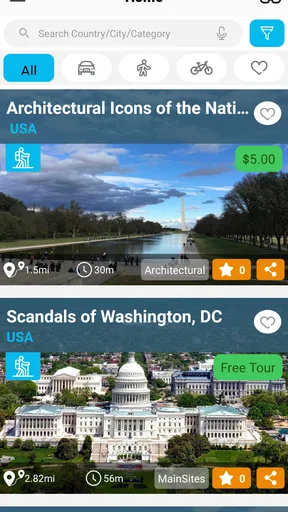
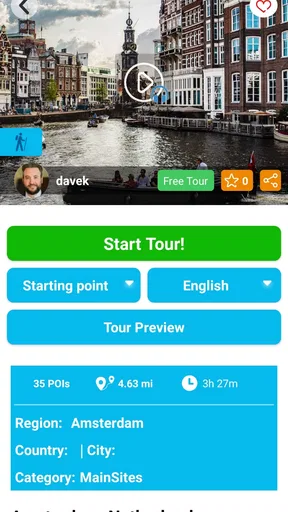
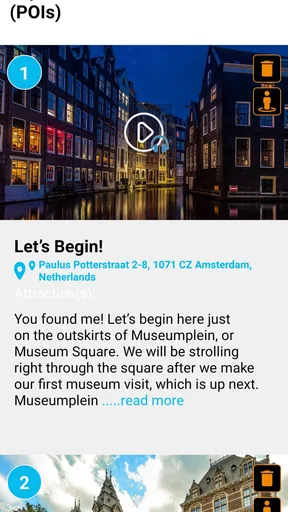
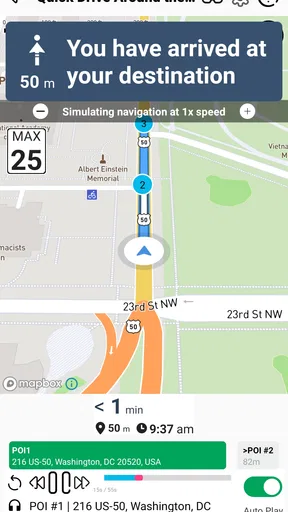

Our Review of UCPlaces | Guided Audio Tours
 Analysis by Appyee
I like travel apps that solve a clear problem without asking me to plan every minute of a trip. UCPlaces | Guided Audio Tours takes that approach by combining spoken sightseeing information with route guidance, so the phone can act as both a tour narrator and a practical travel companion. It belongs to the Travel & Local category, is free to install, and is made by UCPlaces LLC. After spending time with it, I see the strongest appeal in travelers who want structure but still prefer moving at their own pace.
The idea is straightforward, but the execution matters. A self-guided tour is only useful when the narration, navigation, and real-world walking experience work together. I found the app most interesting when I treated it less like a conventional map and more like a flexible audio guide: choose a route, begin exploring, and let the information arrive while I look at the surroundings instead of staring at a screen.
How UCPlaces fits into a real trip
The app has been available since May 22, 2018, and its current release is v2.9.4. Its store presence shows over 500 thousand installs and an average rating of 3.5 from roughly 507 ratings, which suggests a useful but not universally smooth experience. I would not read that rating as a reason to dismiss it. Instead, it tells me that expectations are important: this is a focused touring tool, not a complete replacement for every travel service on a phone.
On a city break, I would use it after arriving in an area I wanted to understand rather than simply photograph. A normal map can get me to a landmark, while a standard search app can tell me opening hours or nearby restaurants. UCPlaces is more useful in the space between those tasks. It gives the outing a narrative shape, helping me connect one stop to the next instead of treating the destination as a collection of isolated pins.
A realistic example would be a free afternoon before dinner. I could select a suitable tour, put the phone away once navigation is clear, and walk through the route without joining a group or matching a guide’s timetable. If I stop for coffee, spend longer at a viewpoint, or take a short detour, the self-guided format is less restrictive than a scheduled tour. That flexibility is the main reason I would recommend trying it.
What the navigation changes
The combination of audio and full navigation is more significant than it first sounds. Audio alone can leave me wondering whether I am approaching the correct place, while map directions alone can turn sightseeing into a screen-checking exercise. UCPlaces attempts to bridge those weaknesses. I can follow the route visually when needed, then return my attention to the street and the buildings around me.
There is also a useful psychological difference between following a prepared route and searching for attractions one by one. With individual searches, I tend to optimize for distance or popularity. A guided route encourages me to accept a little more context and notice how nearby places relate to one another. That makes the app particularly suitable for first visits, when I do not yet know which streets are worth wandering.
My practical advice is to begin the tour before entering a crowded or confusing area. Confirm that the route is active, keep the phone accessible without holding it constantly, and avoid assuming that every turn will be obvious in a busy street. Navigation is helpful, but it should support awareness rather than replace it. At crossings, transit stops, and unfamiliar intersections, I would always verify the surroundings myself.
When the audio format works best
Audio tours are at their best when I have enough time to listen and observe. They are less suitable when I am rushing between transport connections, carrying luggage, or trying to hold a conversation with companions. The app can make a walk feel more purposeful, but it cannot remove the basic demands of travel: battery management, attention to traffic, and the need to adapt when a street is crowded or temporarily inconvenient.
I also think the experience depends on how a person likes to learn. Someone who enjoys historical context and spoken explanations may find the format engaging. Someone who prefers short visual summaries, restaurant recommendations, or spontaneous map browsing may feel that a conventional map application is faster. UCPlaces is not trying to be every kind of travel utility, and its value drops when the main goal is simply reaching a destination.
Trust, controls, and moments that deserve attention
When I review a travel app, I pay attention not only to the route itself but also to how much control the user appears to have. Travel tools can involve location-sensitive moments, because navigation naturally connects the phone with where the user is. That makes it important to notice the choices shown during setup and use, rather than casually accepting every prompt.
For UCPlaces, I would read each permission request carefully and allow only what makes sense for the tour I am taking. If navigation needs location access while I am using the app, that is directly connected to the product’s purpose. I would still check whether the phone offers a choice between limited, approximate, or active-use access, and I would revisit that choice after the trip. The right setting is the one that supports the route without leaving unnecessary access enabled indefinitely.
I would take the same measured approach to notifications, account prompts, and any purchase screen. The app is free, but in-app purchases range from $0.99 to $39.99 per item. That does not make the app poor value, yet it means I would look at the description of each paid item before confirming anything. A traveler using the app with a limited budget should decide in advance whether a particular tour is worth paying for instead of making that decision while distracted in an unfamiliar place.
One of the more useful habits is to separate the travel decision from the data decision. Before starting a route, I would check what the app is asking to access, whether an account is necessary for the action I want, and whether the phone’s system settings show a way to revoke access later. These are simple checks, but they give me a clearer sense of agency than treating the app as a sealed package.
Data-sensitive situations while traveling
Location becomes more sensitive when I am visiting somewhere unfamiliar, especially if I am moving between hotels, private residences, or places I do not want broadly associated with my movements. I would avoid leaving the app running after finishing a tour and would review its access from the operating system rather than relying on memory. If I were using a shared device, I would be especially careful about saved accounts, purchase confirmations, and visible travel history.
Public Wi-Fi is another moment where I would be cautious. I prefer downloading or preparing what I need on a trusted connection when the app allows that workflow, then using the phone with minimal interaction while walking. I would not enter sensitive information on an unfamiliar network simply because a route or purchase prompt appeared at that moment. If something feels urgent, I would wait until I can use a connection and setting I trust.
These precautions are not a criticism unique to UCPlaces. They are sensible for any navigation-based travel service. The important point is that the app’s convenience should not make me forget that a phone can reveal patterns about where I go. I appreciate tools that let me make visible choices, and I would encourage users to inspect the controls offered by their own Android or iOS device before beginning a tour.
Account choices and everyday control
A common question is whether a traveler must create an account immediately. I would look at the first screens and distinguish between what is required to browse or start a tour and what is needed for purchases, saved activity, or other personal functions. If the app presents optional registration, I would postpone it until I know I will benefit from keeping information across sessions. If an account is required for a particular action, I would use a dedicated password rather than reusing one from email or banking.
I would also check the device settings after installation, not just during the first launch. Permissions can be changed later, and notifications can be reduced if they become distracting. This matters because a good guided walk should leave me free to experience the destination. Constant prompts, unnecessary alerts, or unclear purchase paths would undermine the calm, independent style that makes self-guided touring attractive in the first place.
For families, the Everyone content rating makes the app broadly approachable, but that does not mean every travel situation is automatically suitable for children. Adults should still supervise navigation near roads, crowded areas, and unfamiliar public spaces. I would also use device purchase controls if a child might handle the phone, particularly because individual in-app items can have substantially different prices.
Useful workflows beyond simply pressing Start
My first practical workflow would be a short test before committing to a long outing. I would open the app at the accommodation or another safe place, inspect the route, confirm that the narration behaves as expected, and check the phone’s battery level. This catches the most frustrating problems early: unclear navigation, a need to sign in, or a purchase decision appearing when I am already outside and in a hurry.
My second workflow would be to use the app as an orientation tool on the first day, then switch to ordinary map searches on later days. The guided route can provide a useful mental map of a neighborhood. Once I understand the area, I may prefer spontaneous exploration, public transport directions, or a quick search for a specific shop. In that role, UCPlaces complements a map app rather than competing with it.
A third tip is to plan around attention, not just distance. I would avoid starting a narrated route while carrying several bags or trying to photograph every stop. Instead, I would choose a period when I can listen safely, pause when necessary, and let the route shape the walk. That small change makes the experience feel less like multitasking and more like having a private guide.
There is also a trade-off between independence and certainty. A scheduled human tour offers immediate answers and the reassurance of someone who knows the area. UCPlaces offers privacy, flexibility, and the ability to stop whenever I want, but I remain responsible for interpreting directions and handling unexpected changes. Travelers who need constant personal assistance should choose a live guide. Travelers who dislike fixed schedules may find the app much more comfortable.
Who should use it, and who should skip it?
I would recommend UCPlaces to independent visitors, solo travelers, couples, and curious locals who want more context during a walk without joining a group. It is also a good fit for people who prefer learning through listening and who appreciate having navigation attached to the story. The free entry point makes it easy to explore the concept before deciding whether a paid tour fits a particular trip.
I would be more hesitant to recommend it to someone who wants a comprehensive itinerary planner, live transport management, hotel booking, or restaurant discovery in one place. Those tasks belong to other travel tools. I would also suggest skipping it when the day is tightly scheduled or when the traveler cannot safely pay attention to audio and directions. A guided app is not a substitute for awareness, local signs, or common sense.
Compared with a conventional map, UCPlaces offers more interpretation and less emphasis on selecting individual destinations. Compared with a human tour, it gives me more control and usually less interaction. Compared with a podcast or downloaded city guide, its navigation adds practical direction while I am moving. The best choice depends on which compromise matters most: context, flexibility, immediacy, or personal assistance.
My cautious verdict after weighing the experience
UCPlaces | Guided Audio Tours is a focused Travel & Local app with a sensible purpose: make sightseeing more independent by pairing spoken tours with route guidance. I like the way it can turn an unstructured afternoon into a coherent walk without forcing me to follow a group. Its strongest quality is not that it replaces every other travel app, but that it fills a specific gap between a silent map and a scheduled tour.
I would approach it with realistic expectations. Check permissions, review account and notification choices, pay attention to the wording around in-app purchases, and test the route before relying on it in a busy destination. Those steps are especially worthwhile because the app’s average rating of 3.5 reflects a mixed overall reception rather than universal approval. My own recommendation is therefore conditional but positive: try it when you want a flexible narrated walk, not when you need an all-purpose travel command center.
For a free app with an Everyone age rating and a clear self-guided concept, it is worth exploring if audio storytelling suits the way you travel. I would keep a normal map available as a backup, manage location access deliberately, and use the app as one part of a broader travel setup. With that balance, UCPlaces can add meaning to a walk while leaving the final decisions, route changes, and personal data choices in my hands.
Verdict
Strengths of UCPlaces | Guided Audio Tours
- Self-guided tours let you explore at your own pace.
- Audio narration adds context without requiring a live guide.
- Useful for sightseeing independently or with a small group.
- Tours can make unfamiliar neighborhoods easier to navigate.
- A flexible alternative to scheduled group excursions.
Limitations of UCPlaces | Guided Audio Tours
- Tour availability varies significantly by destination.
- Some tours may require mobile data or prior downloads.
- Audio quality and narration style can differ between tours.
- Walking routes may not suit users with limited mobility.
- Content may feel less interactive than a live guided tour.
Similar Picks in This Category
View All
Google Maps
Google LLC3.4

Google Maps Go
Google LLC4.1

Booking.com: Hotels & Travel
Booking.com Hotels & Vacation Rentals4.8

Google Earth
Google LLC3.8

Skyscanner Flights Hotels Cars
Skyscanner Ltd4.8

trivago: Compare hotel prices
trivago N.V.4.4
Frequently Asked Questions
What is UCPlaces | Guided Audio Tours?
UCPlaces is a mobile travel app that provides self-guided audio tours for destinations, landmarks, neighborhoods, and scenic routes. Instead of following a live guide or joining a fixed group, you can explore at your own pace while the app explains the history, culture, architecture, and stories connected to the places you visit. It is designed for independent travelers who want more context during sightseeing.
How do UCPlaces audio tours work?
After selecting a destination or tour, the app guides you through a planned route using location-based audio commentary. As you move between points of interest, relevant stories and explanations can play automatically or become available for you to start manually, depending on the tour. Before beginning, it is worth checking the route details, estimated duration, starting point, and any walking or transportation requirements.
Do I need an internet connection to use UCPlaces?
Internet requirements may vary depending on the specific tour and the way its content is delivered. A connection can be useful for browsing tours, loading maps, accessing descriptions, and downloading or updating audio content. To avoid mobile-data charges or interruptions while sightseeing, it is advisable to prepare the tour in advance and download any available offline materials before leaving reliable Wi-Fi.
Are UCPlaces tours free, or do they require payment?
UCPlaces may offer a combination of free content, previews, and tours that require payment, depending on the destination and the current app catalog. The price and access conditions should be reviewed on the individual tour page before starting. Users should also check whether a purchase unlocks one specific experience, a package, or additional features, and review any subscription terms shown in the app.
Is UCPlaces suitable for families and different types of travelers?
UCPlaces can be a convenient option for solo travelers, couples, families, and anyone who prefers flexible sightseeing without a scheduled group. However, the experience depends on the tour’s walking distance, terrain, pace, language availability, and subject matter. Families should check whether the narration is appropriate for children, while users with mobility limitations should review route information carefully because not every attraction or path may be accessible.
